Introduction
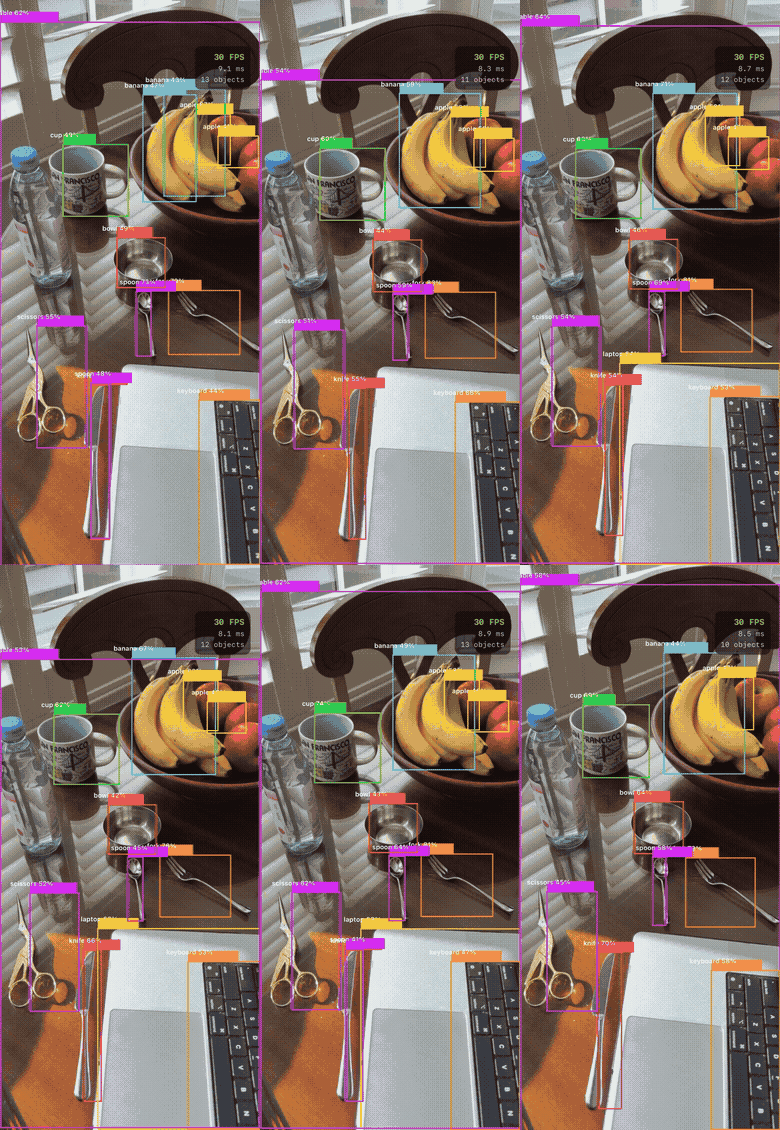
Real-time object detection on iPhone — YOLOv8n running on the Neural Engine at 30 FPS, bounding boxes overlaid live as the camera moves. This is the end result. The rest of this post explains how it works and the choices that got here.
The Problem
Where scene classification assigns one label to an entire image, object detection finds where each object is and what it is — simultaneously, across multiple objects per image. That’s a fundamentally harder output: variable number of boxes, each with a position, size, and class.
Two models are studied to understand this problem from both ends of the design space: DETR (Detection Transformer), which solves detection with pure set prediction and no post-processing, and YOLOv8, which solves it with a fast CNN and baked-in NMS. They make opposite architectural bets — studying both makes the tradeoffs concrete.
The project ships two iPhone apps on the same yolov8n.mlpackage: a photo picker that draws bounding boxes on a selected image, and a live camera app that runs inference at 30 FPS via AVCaptureSession.
Dataset — COCO 2017
COCO (Common Objects in Context) is the standard benchmark for object detection — 80 everyday classes across 118k training images and 5k validation images. Each image contains multiple objects, each annotated with a bounding box [x, y, width, height] and class label.
Unlike scene classification (one label per image), COCO requires the model to produce a variable number of outputs per image — one bounding box and class score per detected object.
Detection Concepts
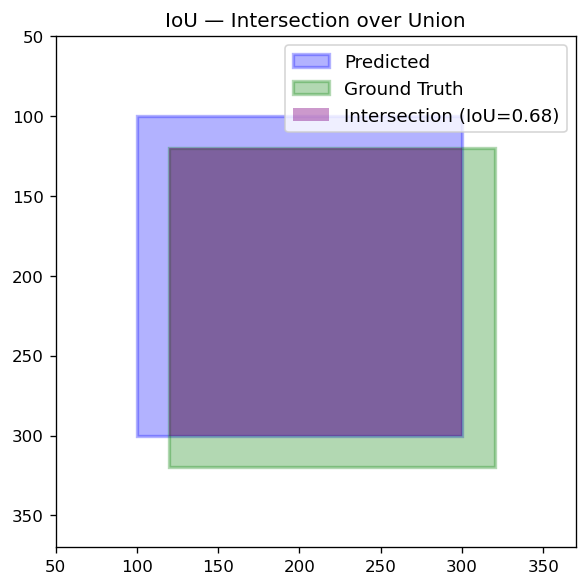
IoU — Intersection over Union
How much two bounding boxes overlap:
IoU = area of overlap / area of union
IoU = 1.0 means identical boxes; IoU = 0.0 means no overlap. Used in two places: NMS filtering and mAP evaluation (a detection counts as correct only if IoU with ground truth ≥ 0.5).
NMS — Non-Maximum Suppression
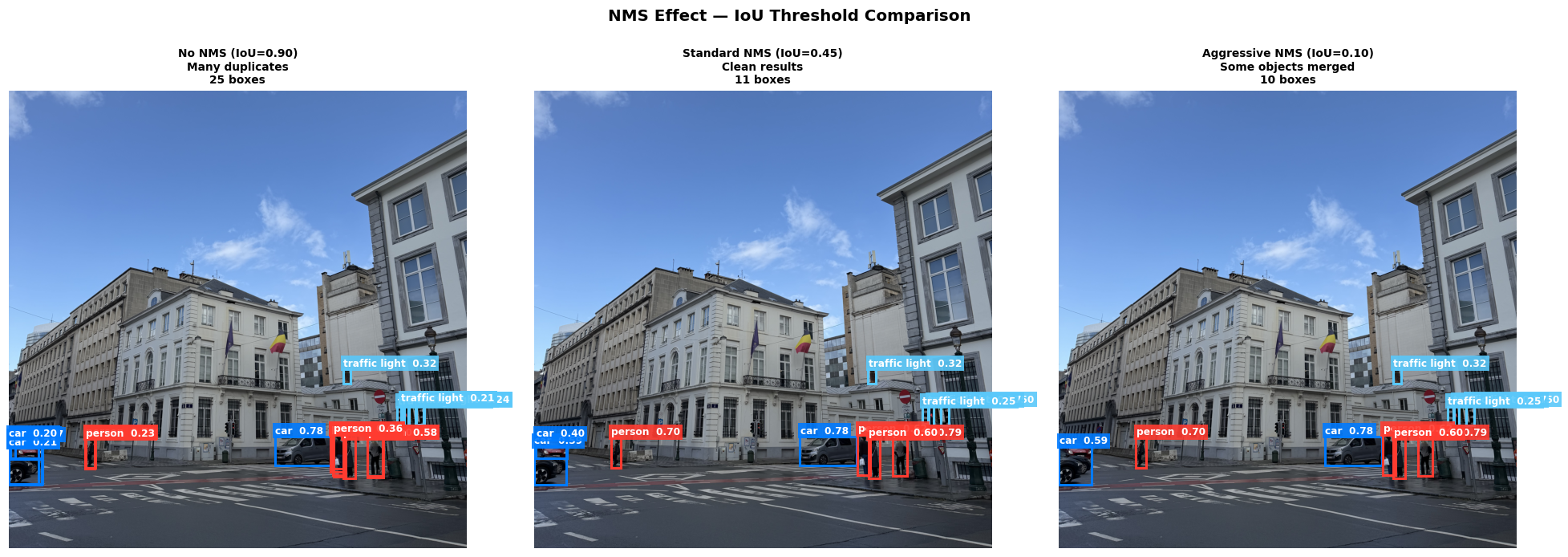
After detection, the model produces many overlapping boxes for the same object. NMS keeps only the best one:
- Sort all boxes by confidence (highest first)
- Keep the top box
- Remove any box that overlaps it by more than the IoU threshold
- Repeat for remaining boxes
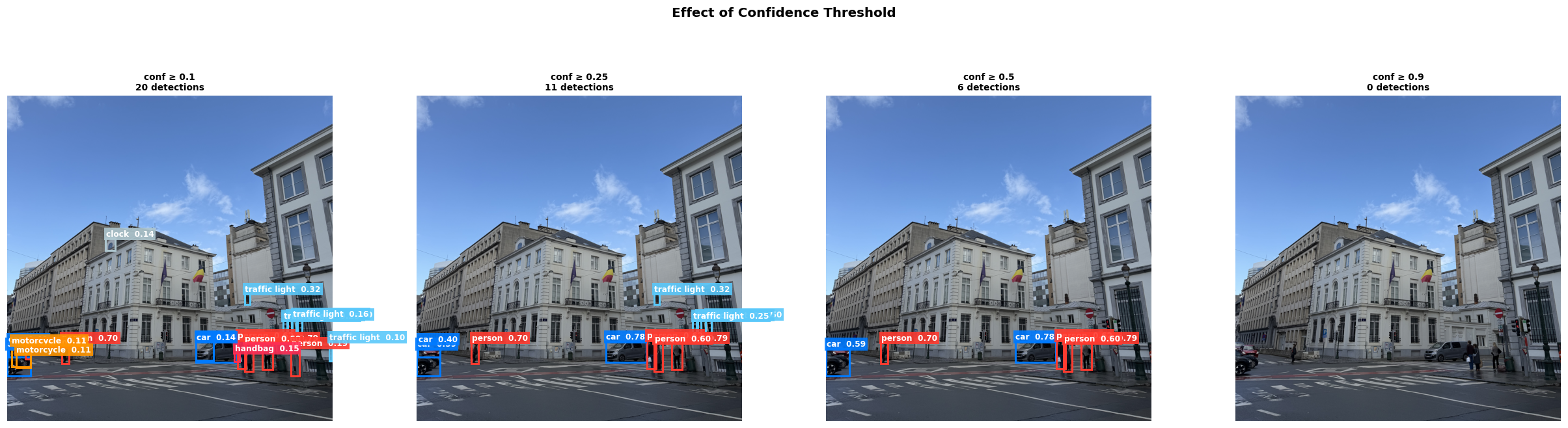
Confidence thresholds control how many boxes are shown — lower threshold means more boxes but more noise:
NMS effect — with vs without suppression on the same image:
mAP — Mean Average Precision
The standard detection metric. AP is the area under the precision-recall curve for one class; mAP averages AP across all 80 COCO classes. mAP@0.5:0.95 averages over IoU thresholds from 0.5 to 0.95 — the stricter COCO benchmark used to compare models.
Architecture — DETR
DETR (Carion et al., 2020) was the first end-to-end object detector using a pure transformer — no anchors, no NMS.
The pipeline:
- CNN backbone (ResNet-50) extracts spatial feature maps from the image
- Positional encoding adds 2D spatial information to the flattened feature map
- Transformer encoder refines features with global self-attention
- Transformer decoder takes 100 learned object queries — each query attends to the encoder output to predict one object
- Prediction heads output a bounding box and class for each query
- Bipartite matching (Hungarian algorithm) assigns predictions to ground truth during training — each query is forced to predict a unique object, eliminating duplicate predictions entirely
Because bipartite matching enforces unique assignments, DETR needs no NMS at inference time. This is its key architectural innovation.
Cross-attention maps show which image regions each object query attends to:
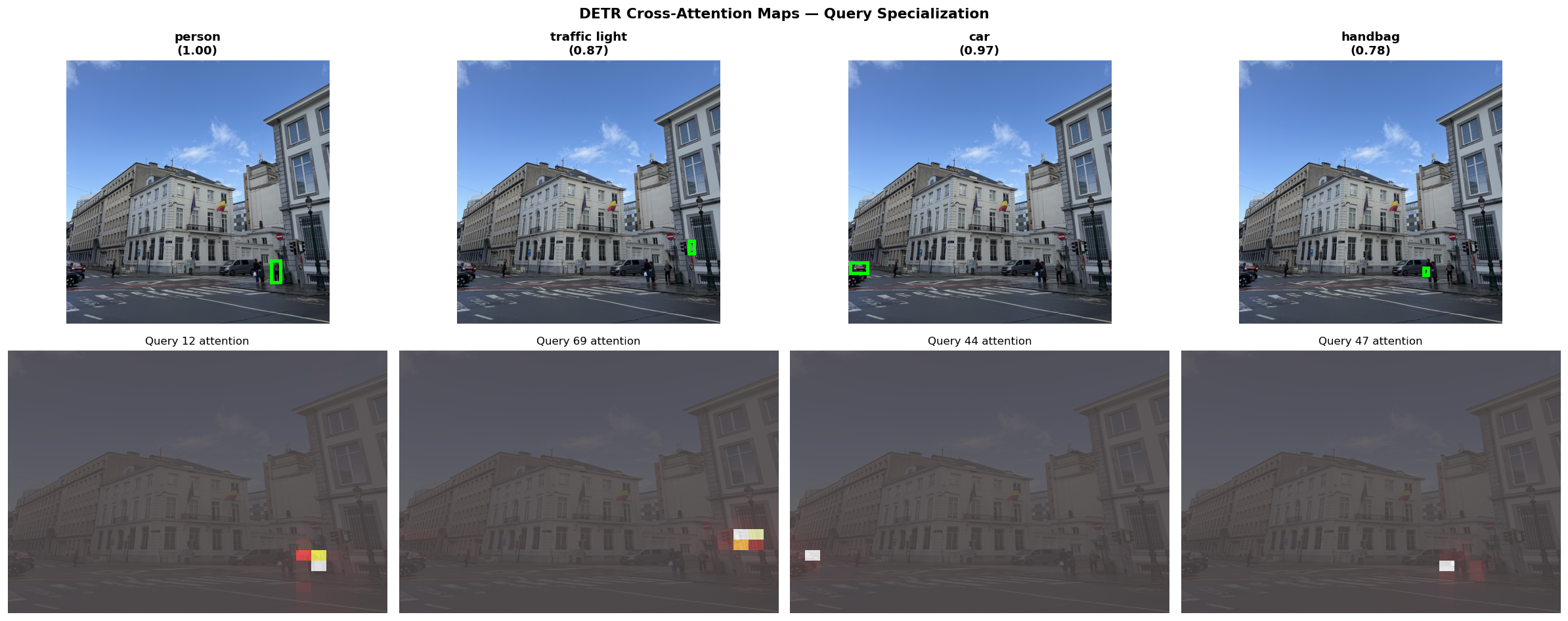
Each query specializes to a different spatial area — one attends to the left side of the scene, another to the center, and so on.
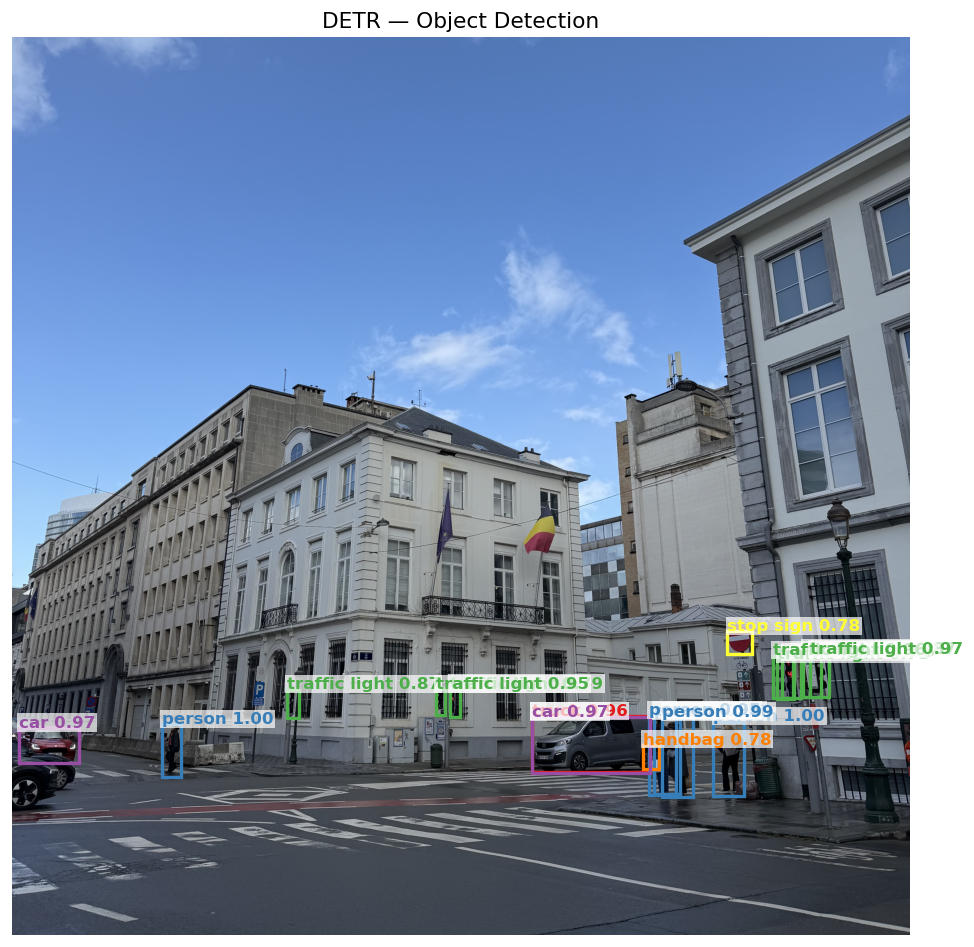
DETR detections on the sample street scene:
Architecture — YOLOv8
YOLOv8 (Ultralytics, 2023) is a CNN-based anchor-free detector — state-of-the-art for real-time inference.
- Backbone + neck: CSPDarknet feature extractor with feature pyramid network for multi-scale detection
- Anchor-free head: predicts box center, size, and class directly — no anchor templates
- NMS post-processing: baked as a static
NMSLayerat CoreML export time
YOLOv8n (nano) has 3.2M parameters vs DETR’s 41M, and exports cleanly to CoreML in one line:
model.export(format="coreml", nms=True)
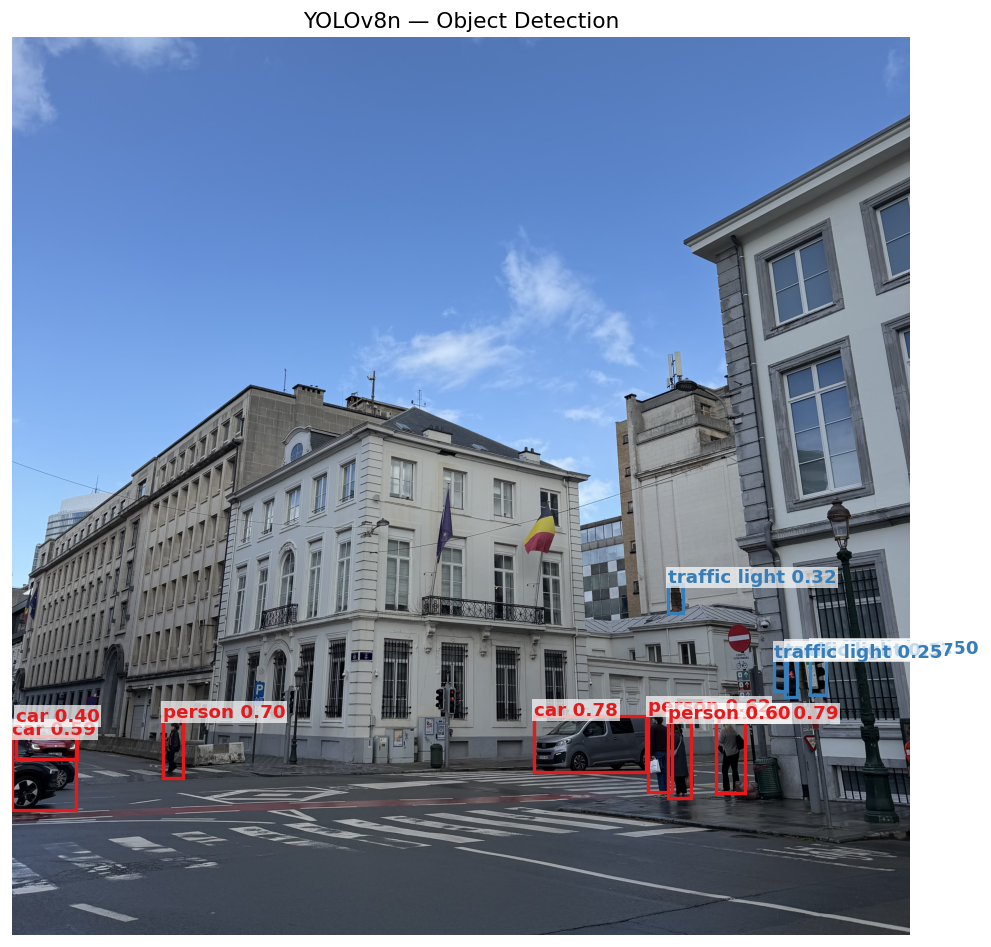
YOLOv8 detections on the same image:
DETR vs YOLOv8
Same image, both models:
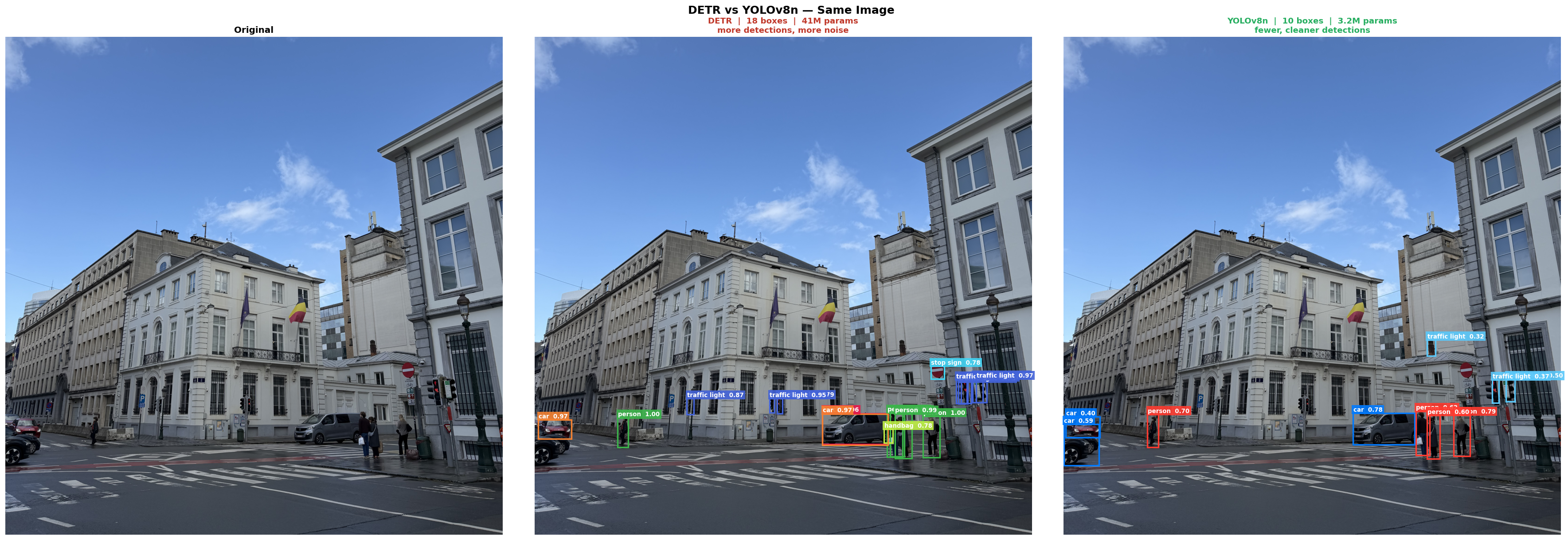
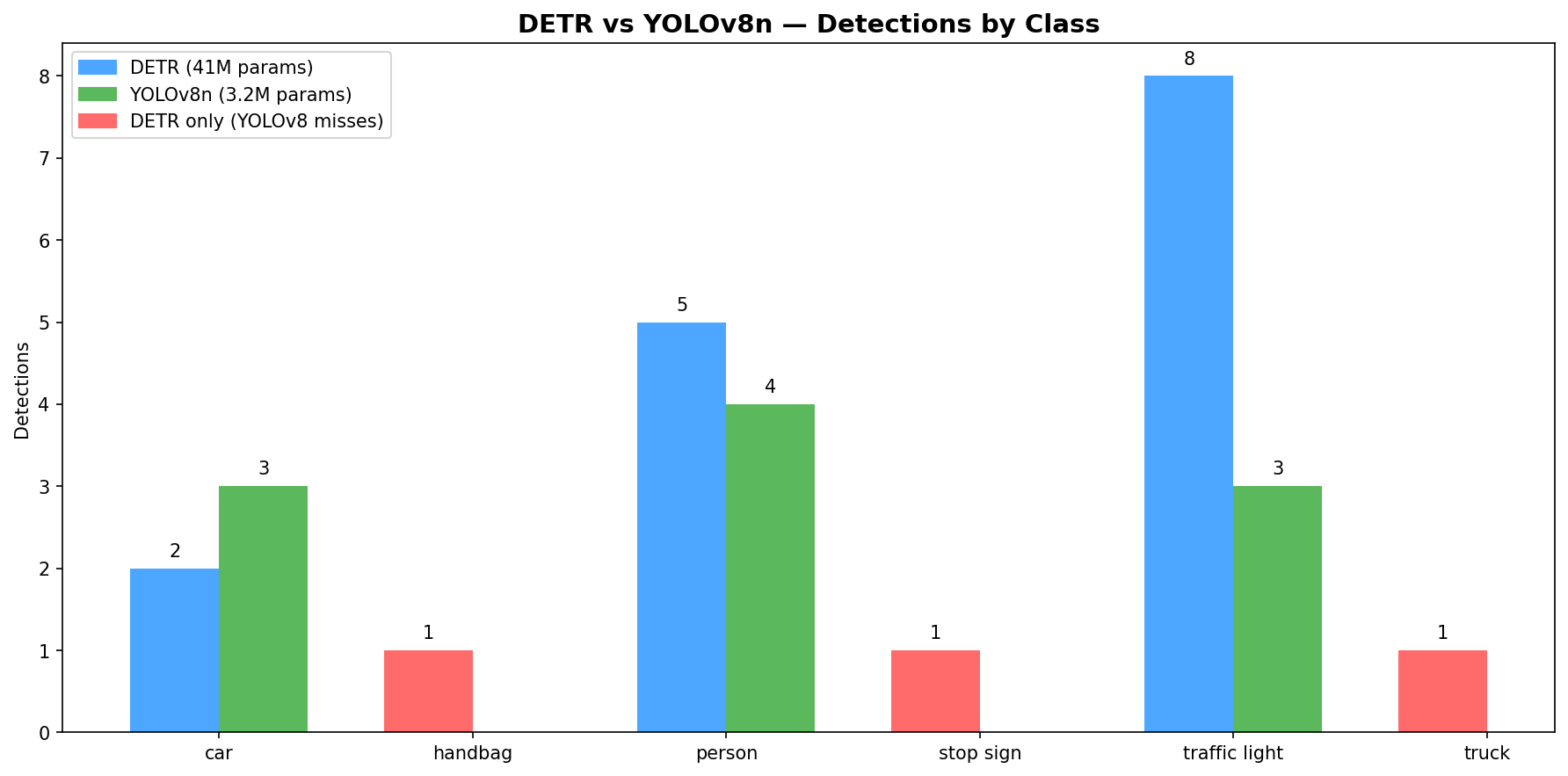
Red bars are classes DETR detects but YOLOv8 misses. DETR fires 8 traffic light boxes vs YOLOv8’s 3, over-detecting on lamp posts. YOLOv8 produces fewer, more precise detections with 13× fewer parameters.
Why DETR can’t export to CoreML: DETR’s post-processing has dynamic control flow — variable-length outputs and conditional masking based on confidence threshold cause torch.jit.trace to break. Trace records one fixed execution path and fails when output shapes change across inputs. YOLOv8 bakes NMS as a static NMSLayer into the CoreML graph — fixed computation regardless of input, traces cleanly.
| DETR | YOLOv8n | |
|---|---|---|
| Architecture | Transformer | CNN |
| Parameters | 41M | 3.2M |
| NMS needed | No (bipartite matching) | Yes |
| CoreML export | Fails (dynamic control flow) | One line |
| mAP@0.5:0.95 | ~42 | ~37 |
Detection Across Scenes
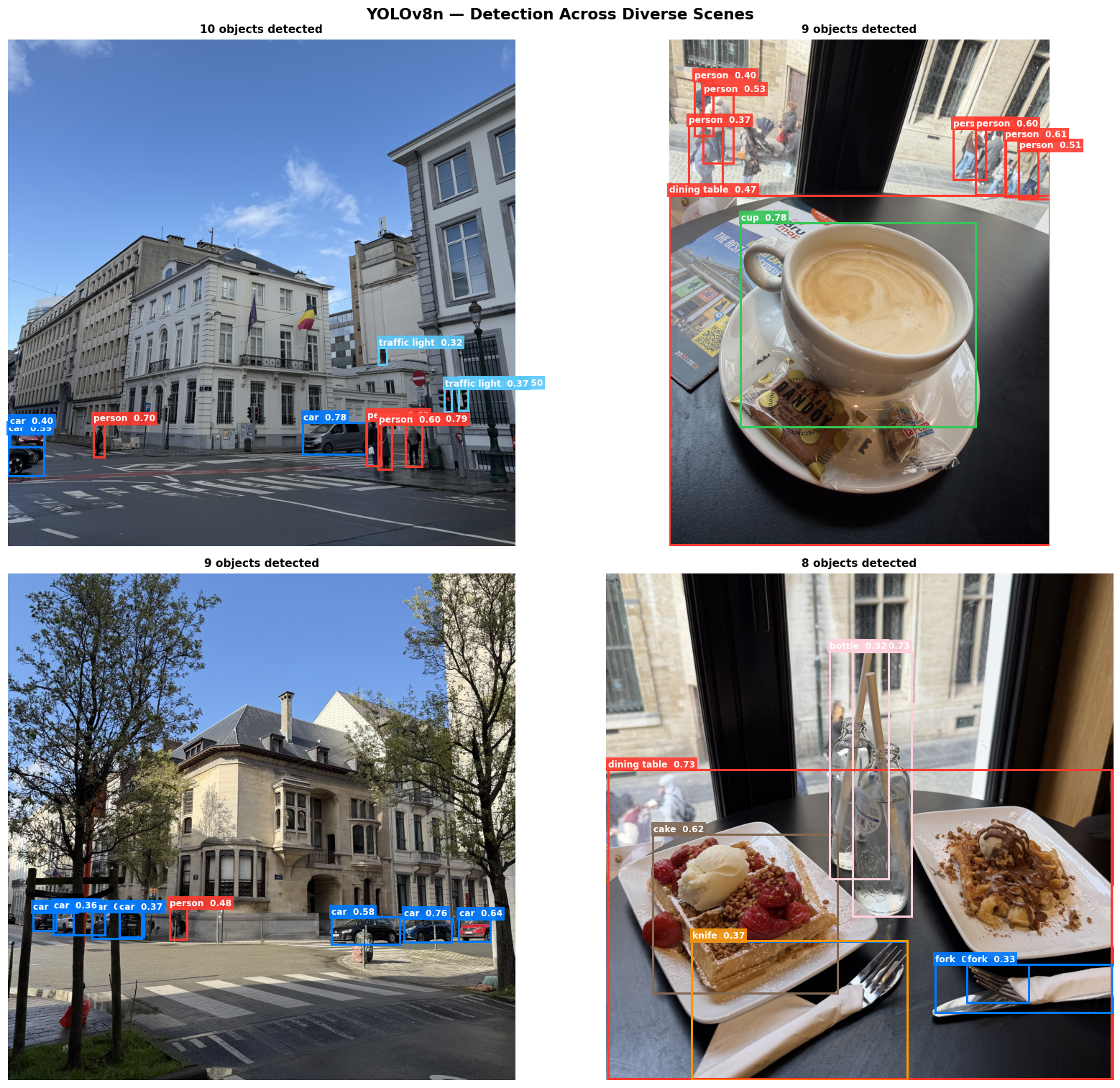
YOLOv8n applied to varied real-world photos — the model generalizes across object types and contexts:
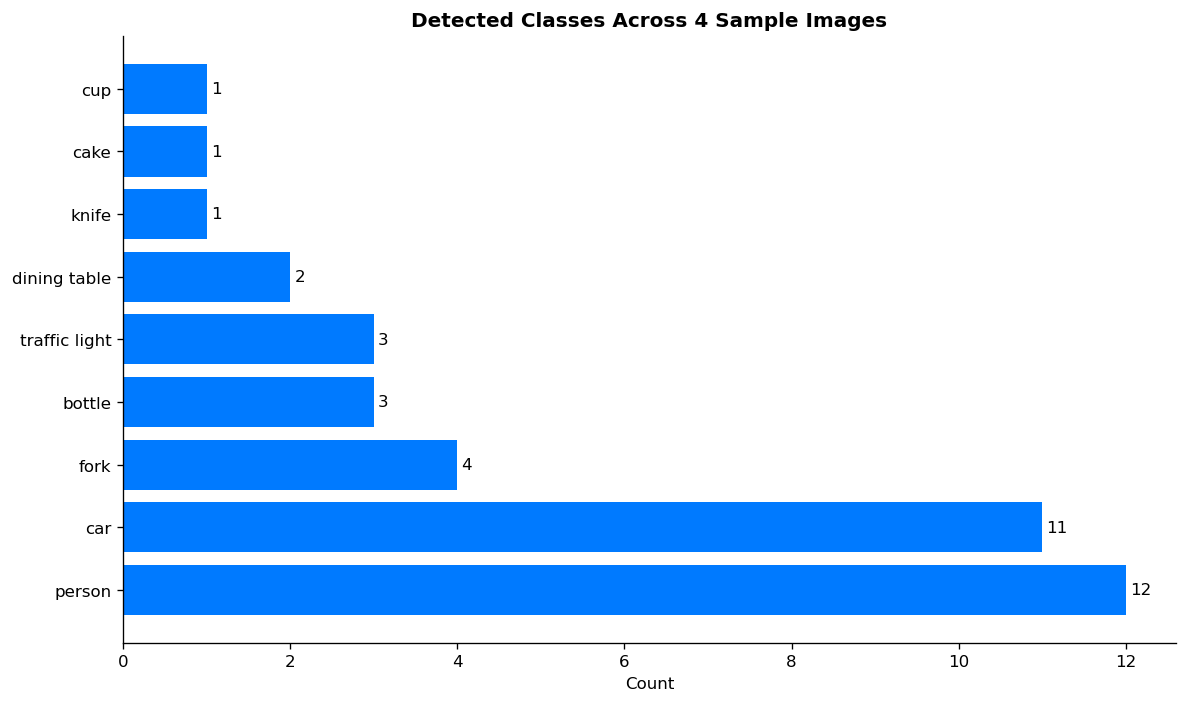
COCO class distribution across the sample images — person and car dominate outdoor scenes, while indoor scenes surface food and tableware classes:
CoreML Export
YOLOv8n exported to CoreML (6.5 MB) with NMS baked in:
model = YOLO("yolov8n.pt")
model.export(format="coreml", nms=True)
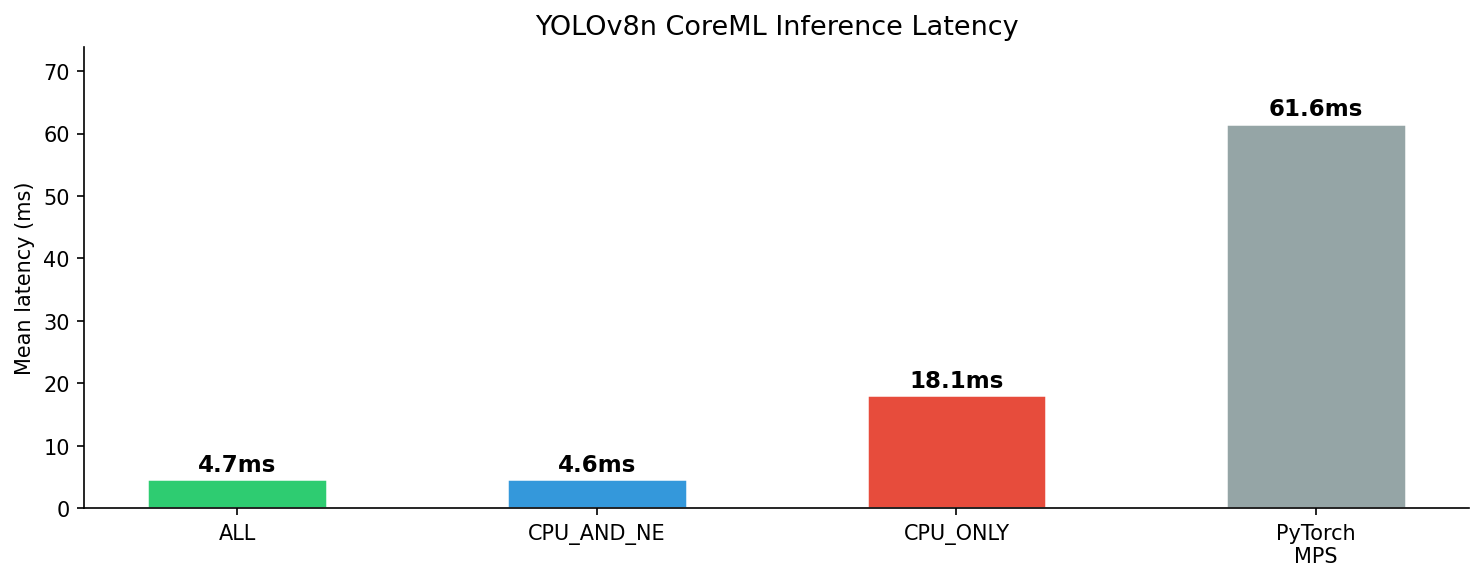
Three variants benchmarked on Apple Silicon (50 runs after 10 warmup):
| Compute Unit | Mean Latency |
|---|---|
| ALL (Neural Engine) | 4.7 ± 0.1 ms |
| CPU_AND_NE | 4.6 ± 0.1 ms |
| CPU_ONLY | 18.1 ± 0.4 ms |
| PyTorch MPS | 61.6 ± 6.5 ms |
ALL routes to the Neural Engine automatically — ~4× faster than CPU-only, and 13× faster than PyTorch MPS. This contrasts with app-01 (ViT-B/16 at 171 MB) where MPS was faster: YOLOv8n at 6.5 MB is small enough for the Neural Engine to route efficiently.
iPhone App
The SwiftUI app loads yolov8n.mlpackage, preprocesses the selected photo, runs inference, and draws bounding boxes with class labels and confidence scores directly on the image.
Preprocessing pipeline (equivalent to YOLOv8’s resize used at export time):
// Resize UIImage to 640×640 → CVPixelBuffer (BGRA)
// CoreML receives the pixel buffer and routes it to the Neural Engine
let output = try model.prediction(image: buffer, iouThreshold: 0.45, confidenceThreshold: 0.4)
Parsing output:
// coordinates: MLMultiArray (N, 4) — normalized (cx, cy, w, h) in [0, 1]
// confidence:  MLMultiArray (N, 80) — class scores per box
let cx = output.coordinates[[i, 0] as [NSNumber]].floatValue
let cy = output.coordinates[[i, 1] as [NSNumber]].floatValue
// Convert to top-left origin: x = cx - w/2, y = cy - h/2
Bounding boxes are drawn using SwiftUI Canvas. Each class maps to a consistent color; the detection list shows top results with confidence bars. A confidence threshold of 0.4 keeps results clean — only detections the model is confident about are shown.

Live Camera Detection
The photo picker app above validated the CoreML pipeline end-to-end on a static input — correct output format, coordinates, and confidence scores. With that confirmed, the input source was swapped to a live camera stream.
The live camera app streams frames directly from the iPhone’s back camera and runs YOLOv8n inference in real time — bounding boxes update every frame as you move the camera.
AVCaptureSession pipeline:
AVCaptureSessionstreams 720p frames (.hd1280x720) from the back camera- Each frame arrives as a
CVPixelBufferviaAVCaptureVideoDataOutput— resized to 640×640 before inference (the model’s expected input size) - YOLOv8n runs on the Neural Engine via
computeUnits = .all - Detections are published via
@Published var detectionsand overlaid using SwiftUICanvas
func captureOutput(_ output: AVCaptureOutput,
                   didOutput sampleBuffer: CMSampleBuffer,
                   from connection: AVCaptureConnection) {
    guard let pixelBuffer = CMSampleBufferGetImageBuffer(sampleBuffer),
          let resized = resize(pixelBuffer, to: CGSize(width: 640, height: 640)) else { return }
    let result = try model.prediction(image: resized,
                                      iouThreshold: 0.45,
                                      confidenceThreshold: 0.4)
}
Inference runs every 2nd frame to prevent queue backlog on the processing thread. FPS and inference time are tracked separately and shown in a heads-up overlay. On a physical iPhone with Neural Engine routing, this runs at ~30 FPS with ~5 ms inference per frame.
INT8 Quantization
YOLOv8n re-exported with INT8 weight quantization — same model, 4× smaller file size, faster on-device.
model.export(format='coreml', nms=True, int8=True)
coremltools compresses weights from 32-bit floats to 8-bit integers during export. The Neural Engine handles INT8 natively on A-series chips.
| FP32 | INT8 | |
|---|---|---|
| File size | 6.5 MB | 1.7 MB |
| Mean latency (Neural Engine) | 4.7 ms | 4.2 ms |
| mAP50 (COCO val) | 0.524 | 0.521 |
4× smaller with negligible accuracy drop (0.3% mAP). For a model already running at 4.7 ms, the latency gain is modest — the real win is storage and memory bandwidth for on-device deployment.
See notebooks/05_int8_export.ipynb for the full benchmark: 50-run latency comparison and side-by-side detection output.
Technologies
| Technology | Used For |
|---|---|
| PyTorch + transformers | DETR architecture and inference |
| Ultralytics YOLOv8 | Detection, inference, CoreML export |
| coremltools | CoreML export and benchmarking |
| SwiftUI + PhotosUI | iOS app UI |
| AVFoundation | Live camera feed (AVCaptureSession) |
| CoreML | On-device inference |
Insights
DETR is architecturally elegant but impractical for on-device deployment. Eliminating NMS via bipartite matching is a genuine innovation — but the resulting dynamic post-processing graph prevents CoreML export. For production CV, a static graph matters as much as accuracy.
Smaller models benefit more from the Neural Engine. YOLOv8n at 6.5 MB achieves 13× speedup over PyTorch MPS via CoreML. ViT-B/16 at 171 MB showed almost no speedup — the Neural Engine’s efficiency advantage depends on model size fitting within its memory budget.
More detections ≠ better. DETR fires 18 boxes on the Brussels street scene vs YOLOv8’s 10. The extras include arms detected as handbag and lamp posts as traffic lights. Fewer, more precise detections with a clean export make YOLOv8 the right choice for deployment.
Source code on GitHub